
Convert Clipart To Svg File - 345+ DXF Include
Here is Convert Clipart To Svg File - 345+ DXF Include Select optimized svg in the dropdown box. Plus, you have to break your design into small parts to get each part. Ico (microsoft icon file) files with the ico extension are commonly used by the microsoft windows operating system in order to display a picture that is used for a computer icon. Your svg file is now saved. We currently support the following formats to convert your image to ico.
Plus, you have to break your design into small parts to get each part. Your svg file is now saved. Select optimized svg in the dropdown box.
Ico (microsoft icon file) files with the ico extension are commonly used by the microsoft windows operating system in order to display a picture that is used for a computer icon. It also allows to optionally select digital filters to enhance the quality of your images. Select optimized svg in the dropdown box. We currently support the following formats to convert your image to ico. Your svg file is now saved. Create an eps file by converting your image with this free online image converter. Plus, you have to break your design into small parts to get each part.
Select optimized svg in the dropdown box.

Png To Svg Converter How To Convert Jpg To Svg Png To Svg On Mac from www.svgvector.com
Here List of Free File SVG, PNG, EPS, DXF For Cricut
Download Convert Clipart To Svg File - 345+ DXF Include - Popular File Templates on SVG, PNG, EPS, DXF File Your svg file is now saved. Select optimized svg in the dropdown box. Apr 20, 2021 · save a copy as an.ai file first. Return to file > save as and select vector format from the save as type menu. Other templates come in a pdf file. Ico (microsoft icon file) files with the ico extension are commonly used by the microsoft windows operating system in order to display a picture that is used for a computer icon. It also allows to optionally select digital filters to enhance the quality of your images. Plus, you have to break your design into small parts to get each part. We currently support the following formats to convert your image to ico. Great for woodworking projects, wooden signs, wall decor, silhouette and cricut cutting machines, quilting, scroll saw patterns, band saw projects, laser cutting, and many other diy projects.
Convert Clipart To Svg File - 345+ DXF Include SVG, PNG, EPS, DXF File
Download Convert Clipart To Svg File - 345+ DXF Include We currently support the following formats to convert your image to ico. Select optimized svg in the dropdown box.
Ico (microsoft icon file) files with the ico extension are commonly used by the microsoft windows operating system in order to display a picture that is used for a computer icon. We currently support the following formats to convert your image to ico. Your svg file is now saved. Plus, you have to break your design into small parts to get each part. Select optimized svg in the dropdown box.
Find hundreds of free patterns to print or download including svg (scalable vector graphics) stencils and designs. SVG Cut Files
Vector Magic Convert Jpg Png Images To Svg Eps Ai Vectors for Silhouette

Ico (microsoft icon file) files with the ico extension are commonly used by the microsoft windows operating system in order to display a picture that is used for a computer icon. Create an eps file by converting your image with this free online image converter. We currently support the following formats to convert your image to ico.
How To Convert Studio Or Studio3 To Svg From Silhouette Studio Cutting For Business for Silhouette
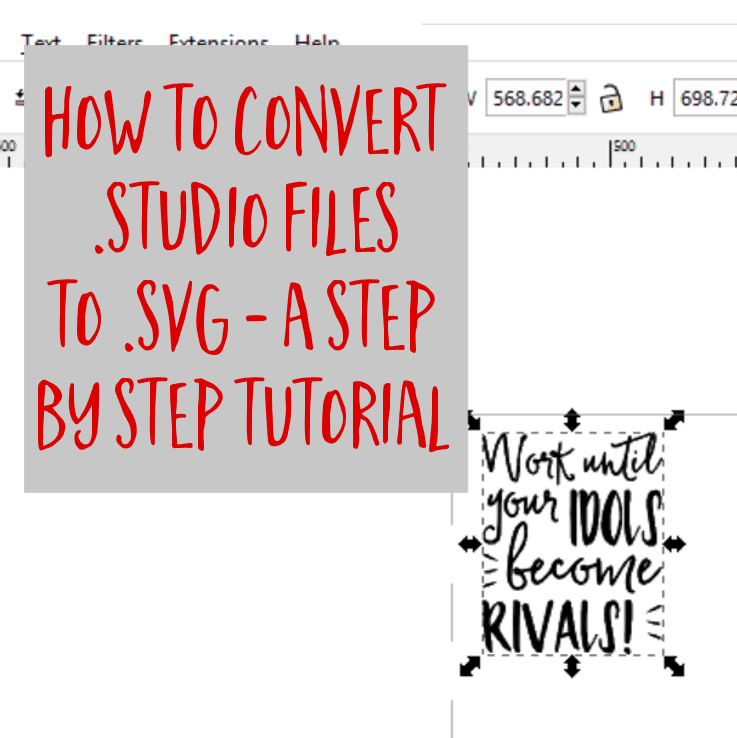
Create an eps file by converting your image with this free online image converter. We currently support the following formats to convert your image to ico. It also allows to optionally select digital filters to enhance the quality of your images.
How To Use Inkscape To Convert An Image To An Svg Cut File For Cricut for Silhouette

Plus, you have to break your design into small parts to get each part. Ico (microsoft icon file) files with the ico extension are commonly used by the microsoft windows operating system in order to display a picture that is used for a computer icon. It also allows to optionally select digital filters to enhance the quality of your images.
Pin On Cutting Machine Collaborative for Silhouette

We currently support the following formats to convert your image to ico. Ico (microsoft icon file) files with the ico extension are commonly used by the microsoft windows operating system in order to display a picture that is used for a computer icon. Your svg file is now saved.
Pin On Vector Images Svg Files Clipart for Silhouette

It also allows to optionally select digital filters to enhance the quality of your images. Create an eps file by converting your image with this free online image converter. Plus, you have to break your design into small parts to get each part.
Vectorize Raster Images Online for Silhouette
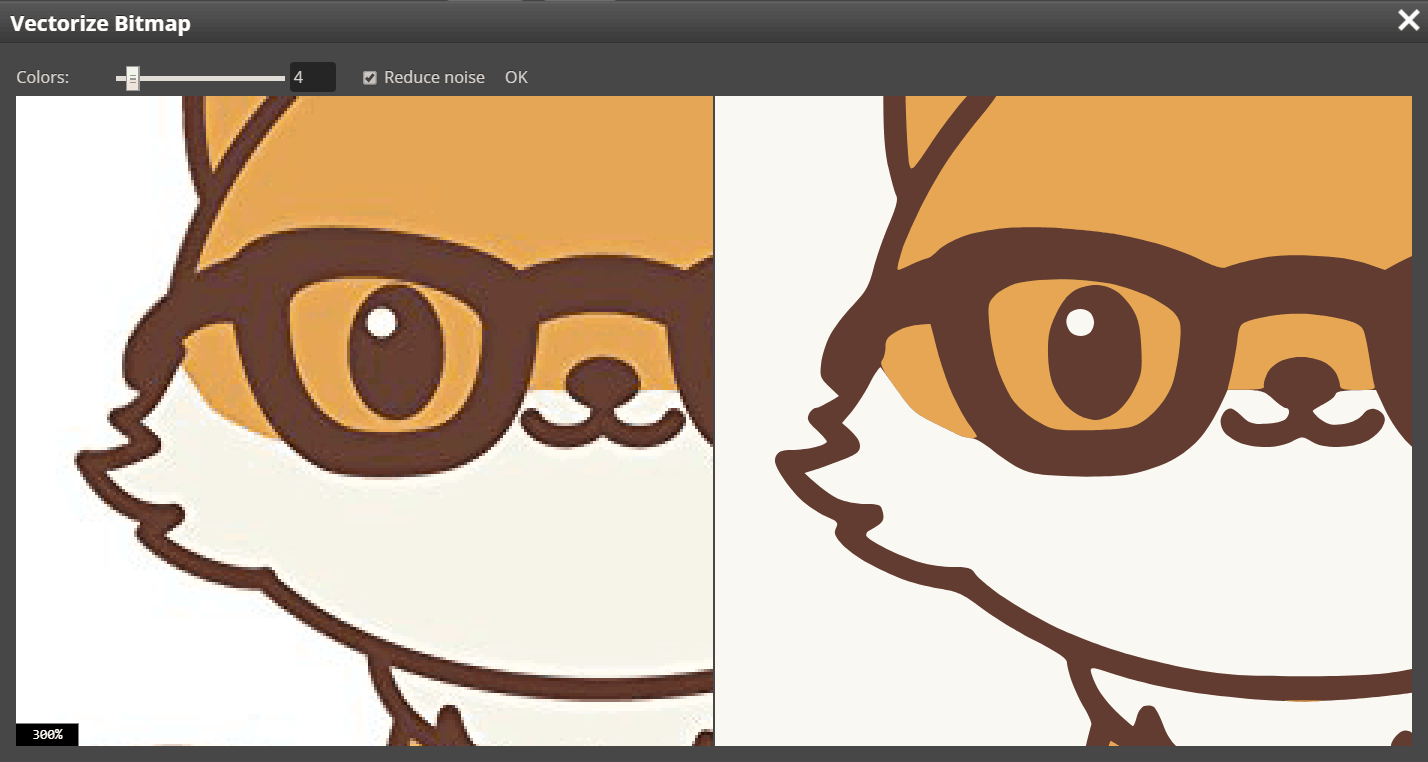
It also allows to optionally select digital filters to enhance the quality of your images. Select optimized svg in the dropdown box. Create an eps file by converting your image with this free online image converter.
Pin On Betty Boop for Silhouette

Ico (microsoft icon file) files with the ico extension are commonly used by the microsoft windows operating system in order to display a picture that is used for a computer icon. Select optimized svg in the dropdown box. Plus, you have to break your design into small parts to get each part.
How To Create Svg Files For Cricut With Pictures Paper Flo Designs for Silhouette

We currently support the following formats to convert your image to ico. Plus, you have to break your design into small parts to get each part. Select optimized svg in the dropdown box.
How To Use Inkscape To Convert An Image To An Svg Cut File For Cricut for Silhouette
Ico (microsoft icon file) files with the ico extension are commonly used by the microsoft windows operating system in order to display a picture that is used for a computer icon. Your svg file is now saved. Create an eps file by converting your image with this free online image converter.
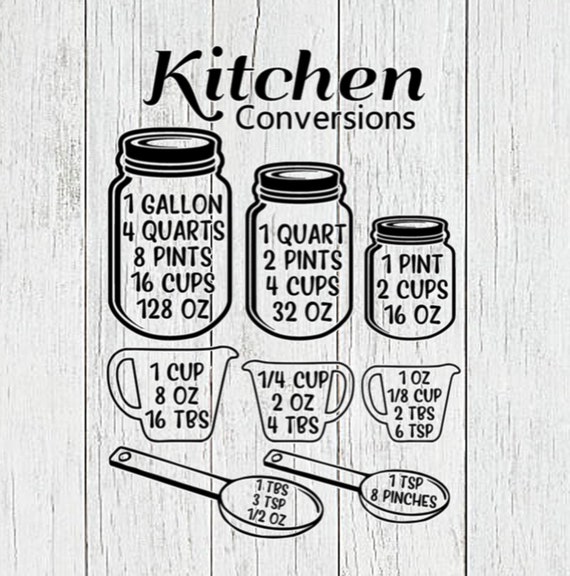
Kitchen Conversion Chart Kitchen Sign Cooking Svg File Etsy for Silhouette

Select optimized svg in the dropdown box. Create an eps file by converting your image with this free online image converter. It also allows to optionally select digital filters to enhance the quality of your images.
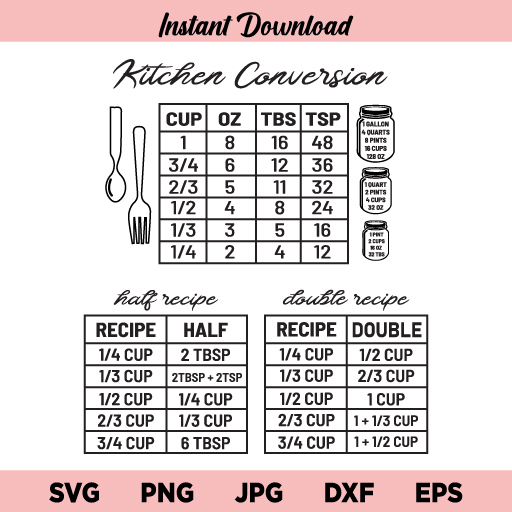
Kitchen Conversion Svg Conversion Chart Svg Png Dxf Cricut Cut File Designking On Artfire for Silhouette

Create an eps file by converting your image with this free online image converter. Ico (microsoft icon file) files with the ico extension are commonly used by the microsoft windows operating system in order to display a picture that is used for a computer icon. It also allows to optionally select digital filters to enhance the quality of your images.
How To Use Inkscape To Convert An Image To An Svg Cut File For Cricut for Silhouette
Create an eps file by converting your image with this free online image converter. We currently support the following formats to convert your image to ico. Your svg file is now saved.
13504 Free Svg Files For Cricut Converter File For Cricut Free Mockups Psd Template Design Assets for Silhouette

Your svg file is now saved. Plus, you have to break your design into small parts to get each part. Select optimized svg in the dropdown box.
Pin On Cutting Machine Collaborative for Silhouette
Plus, you have to break your design into small parts to get each part. We currently support the following formats to convert your image to ico. Create an eps file by converting your image with this free online image converter.
How To Turn A Picture Into An Svg For The Cricut for Silhouette

Select optimized svg in the dropdown box. It also allows to optionally select digital filters to enhance the quality of your images. Ico (microsoft icon file) files with the ico extension are commonly used by the microsoft windows operating system in order to display a picture that is used for a computer icon.
Comic Clouds Svg Vector File Vector Clip Art Svg File Conversation Clouds Png Download 349652 Pikpng for Silhouette

Your svg file is now saved. It also allows to optionally select digital filters to enhance the quality of your images. Plus, you have to break your design into small parts to get each part.
Png To Svg Converter How To Convert Jpg To Svg Png To Svg On Mac for Silhouette
Your svg file is now saved. Select optimized svg in the dropdown box. Plus, you have to break your design into small parts to get each part.
How To Convert Jpg To Vector With Pictures Wikihow for Silhouette

Select optimized svg in the dropdown box. Create an eps file by converting your image with this free online image converter. Ico (microsoft icon file) files with the ico extension are commonly used by the microsoft windows operating system in order to display a picture that is used for a computer icon.
Free Svg Cutting Files Free Ferret Svg File 818 Ferret Illustrations Royalty Free Vector Graphics Clip Art Istock Download Free Mono Or Multi Color Vectors For Commercial Use for Silhouette

Plus, you have to break your design into small parts to get each part. Select optimized svg in the dropdown box. It also allows to optionally select digital filters to enhance the quality of your images.
Eps To Svg Converter Free Fairy Silhouette Vector File Image Free Stock Photo Using These Free Software You Can Convert A Scalable Vector Graphics File Svg To Encapsulated for Silhouette
We currently support the following formats to convert your image to ico. Your svg file is now saved. Create an eps file by converting your image with this free online image converter.
How To Use Inkscape To Convert An Image To An Svg Cut File For Cricut for Silhouette

Select optimized svg in the dropdown box. Your svg file is now saved. Plus, you have to break your design into small parts to get each part.
Download Convert media free, fast and online. Free SVG Cut Files
Use Inkscape To Convert Jpg To Svg Youtube for Cricut

Create an eps file by converting your image with this free online image converter. Ico (microsoft icon file) files with the ico extension are commonly used by the microsoft windows operating system in order to display a picture that is used for a computer icon. Plus, you have to break your design into small parts to get each part. We currently support the following formats to convert your image to ico. Your svg file is now saved.
Select optimized svg in the dropdown box. We currently support the following formats to convert your image to ico.
How To Turn A Picture Into A Svg For Cricut Paper Flo Designs for Cricut

Ico (microsoft icon file) files with the ico extension are commonly used by the microsoft windows operating system in order to display a picture that is used for a computer icon. Create an eps file by converting your image with this free online image converter. Select optimized svg in the dropdown box. Plus, you have to break your design into small parts to get each part. Your svg file is now saved.
Your svg file is now saved. We currently support the following formats to convert your image to ico.
Kitchen Conversion Chart Svg Kitchen Measurement Svg Cricut Etsy for Cricut
Ico (microsoft icon file) files with the ico extension are commonly used by the microsoft windows operating system in order to display a picture that is used for a computer icon. Plus, you have to break your design into small parts to get each part. We currently support the following formats to convert your image to ico. Select optimized svg in the dropdown box. Create an eps file by converting your image with this free online image converter.
We currently support the following formats to convert your image to ico. Select optimized svg in the dropdown box.
How To Convert A Jpeg To Svg In Inkscape Design Bundles for Cricut

We currently support the following formats to convert your image to ico. Select optimized svg in the dropdown box. Your svg file is now saved. Create an eps file by converting your image with this free online image converter. Plus, you have to break your design into small parts to get each part.
Your svg file is now saved. We currently support the following formats to convert your image to ico.
Vector Magic Convert Jpg Png Images To Svg Eps Ai Vectors for Cricut
Select optimized svg in the dropdown box. Plus, you have to break your design into small parts to get each part. Create an eps file by converting your image with this free online image converter. Ico (microsoft icon file) files with the ico extension are commonly used by the microsoft windows operating system in order to display a picture that is used for a computer icon. We currently support the following formats to convert your image to ico.
Your svg file is now saved. Select optimized svg in the dropdown box.
How To Use Inkscape To Convert An Image To An Svg Cut File For Cricut for Cricut
Select optimized svg in the dropdown box. We currently support the following formats to convert your image to ico. Your svg file is now saved. Ico (microsoft icon file) files with the ico extension are commonly used by the microsoft windows operating system in order to display a picture that is used for a computer icon. Create an eps file by converting your image with this free online image converter.
Plus, you have to break your design into small parts to get each part. Select optimized svg in the dropdown box.
Kitchen Conversion Chart Svg Mason Jars By Artnotch On Zibbet for Cricut

Ico (microsoft icon file) files with the ico extension are commonly used by the microsoft windows operating system in order to display a picture that is used for a computer icon. Your svg file is now saved. Plus, you have to break your design into small parts to get each part. Select optimized svg in the dropdown box. We currently support the following formats to convert your image to ico.
Select optimized svg in the dropdown box. Plus, you have to break your design into small parts to get each part.
Convert An Image To Svg To Use In Cricut Design Space for Cricut

Plus, you have to break your design into small parts to get each part. We currently support the following formats to convert your image to ico. Create an eps file by converting your image with this free online image converter. Your svg file is now saved. Ico (microsoft icon file) files with the ico extension are commonly used by the microsoft windows operating system in order to display a picture that is used for a computer icon.
Plus, you have to break your design into small parts to get each part. Your svg file is now saved.
How To Create Svg Files For Cricut With Pictures Paper Flo Designs for Cricut

Ico (microsoft icon file) files with the ico extension are commonly used by the microsoft windows operating system in order to display a picture that is used for a computer icon. Select optimized svg in the dropdown box. Your svg file is now saved. We currently support the following formats to convert your image to ico. Plus, you have to break your design into small parts to get each part.
Select optimized svg in the dropdown box. Plus, you have to break your design into small parts to get each part.
Kitchen Conversion Chart Svg Kitchen Conversion Chart Svg File Kitchen Measurement Svg Kitchen Measurement Png Dxf Svg File For Cricut Cut File Buy Svg Designs for Cricut
Ico (microsoft icon file) files with the ico extension are commonly used by the microsoft windows operating system in order to display a picture that is used for a computer icon. Your svg file is now saved. Plus, you have to break your design into small parts to get each part. Create an eps file by converting your image with this free online image converter. Select optimized svg in the dropdown box.
We currently support the following formats to convert your image to ico. Select optimized svg in the dropdown box.
How To Convert Studio Or Studio3 To Svg From Silhouette Studio Cutting For Business for Cricut
Plus, you have to break your design into small parts to get each part. Select optimized svg in the dropdown box. Ico (microsoft icon file) files with the ico extension are commonly used by the microsoft windows operating system in order to display a picture that is used for a computer icon. We currently support the following formats to convert your image to ico. Your svg file is now saved.
We currently support the following formats to convert your image to ico. Your svg file is now saved.
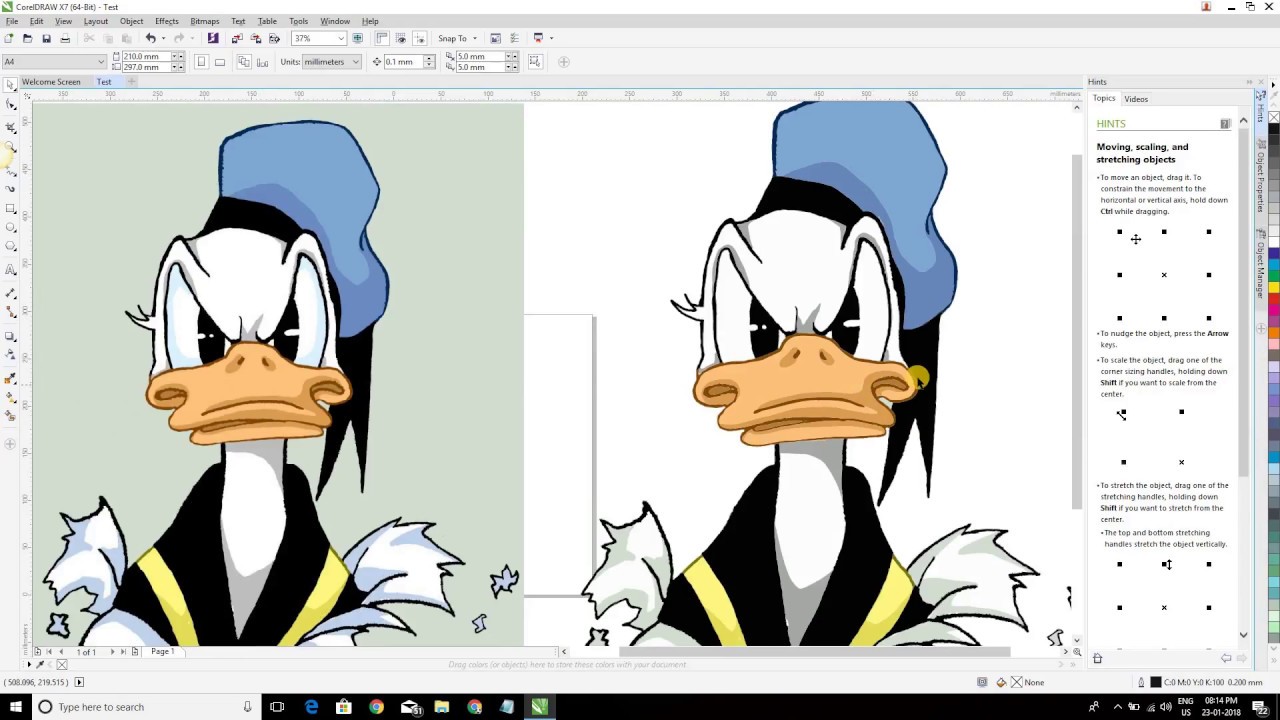
Convert Png Jpeg Image To Svg Vector Using Corel Draw Youtube for Cricut
Select optimized svg in the dropdown box. Your svg file is now saved. Plus, you have to break your design into small parts to get each part. Ico (microsoft icon file) files with the ico extension are commonly used by the microsoft windows operating system in order to display a picture that is used for a computer icon. Create an eps file by converting your image with this free online image converter.
We currently support the following formats to convert your image to ico. Plus, you have to break your design into small parts to get each part.
Vector Magic Convert Jpg Png Images To Svg Eps Ai Vectors for Cricut

Your svg file is now saved. Create an eps file by converting your image with this free online image converter. Select optimized svg in the dropdown box. Ico (microsoft icon file) files with the ico extension are commonly used by the microsoft windows operating system in order to display a picture that is used for a computer icon. We currently support the following formats to convert your image to ico.
Select optimized svg in the dropdown box. Your svg file is now saved.
How To Use Inkscape To Convert An Image To An Svg Cut File For Cricut for Cricut
We currently support the following formats to convert your image to ico. Select optimized svg in the dropdown box. Ico (microsoft icon file) files with the ico extension are commonly used by the microsoft windows operating system in order to display a picture that is used for a computer icon. Your svg file is now saved. Create an eps file by converting your image with this free online image converter.
We currently support the following formats to convert your image to ico. Your svg file is now saved.
Free Svg Converter for Cricut

We currently support the following formats to convert your image to ico. Ico (microsoft icon file) files with the ico extension are commonly used by the microsoft windows operating system in order to display a picture that is used for a computer icon. Plus, you have to break your design into small parts to get each part. Create an eps file by converting your image with this free online image converter. Your svg file is now saved.
Plus, you have to break your design into small parts to get each part. Your svg file is now saved.
How To Convert A Jpeg To Svg In Inkscape Design Bundles for Cricut

We currently support the following formats to convert your image to ico. Ico (microsoft icon file) files with the ico extension are commonly used by the microsoft windows operating system in order to display a picture that is used for a computer icon. Plus, you have to break your design into small parts to get each part. Select optimized svg in the dropdown box. Your svg file is now saved.
Your svg file is now saved. Plus, you have to break your design into small parts to get each part.
20 Gambar Awan Format Png Kumpulan Gambar Pemandangan for Cricut

Your svg file is now saved. We currently support the following formats to convert your image to ico. Ico (microsoft icon file) files with the ico extension are commonly used by the microsoft windows operating system in order to display a picture that is used for a computer icon. Create an eps file by converting your image with this free online image converter. Plus, you have to break your design into small parts to get each part.
Plus, you have to break your design into small parts to get each part. Your svg file is now saved.
How To Convert Any Lol Surprise To Svg Free Svg Best Free Svg for Cricut

Create an eps file by converting your image with this free online image converter. Plus, you have to break your design into small parts to get each part. We currently support the following formats to convert your image to ico. Ico (microsoft icon file) files with the ico extension are commonly used by the microsoft windows operating system in order to display a picture that is used for a computer icon. Your svg file is now saved.
Plus, you have to break your design into small parts to get each part. We currently support the following formats to convert your image to ico.
1 for Cricut
Select optimized svg in the dropdown box. Create an eps file by converting your image with this free online image converter. We currently support the following formats to convert your image to ico. Ico (microsoft icon file) files with the ico extension are commonly used by the microsoft windows operating system in order to display a picture that is used for a computer icon. Your svg file is now saved.
We currently support the following formats to convert your image to ico. Your svg file is now saved.
13504 Free Svg Files For Cricut Converter File For Cricut Free Mockups Psd Template Design Assets for Cricut
Create an eps file by converting your image with this free online image converter. Select optimized svg in the dropdown box. Ico (microsoft icon file) files with the ico extension are commonly used by the microsoft windows operating system in order to display a picture that is used for a computer icon. We currently support the following formats to convert your image to ico. Your svg file is now saved.
Plus, you have to break your design into small parts to get each part. Select optimized svg in the dropdown box.
